Music, Audiobooks and Videos on the GKD Pixel 2
The GKD Pixel 2 has a good screen, a speaker, a headphone jack and room for a big card, so it makes a handy music and video player too. ZyperOS has one built in, called MP4, for music, audiobooks and videos. SELECT opens it from the library and menus, including a paused game's menu. This guide shows where files go, which ones play well, and the controls.
On this page
These steps cover ZyperOS 1.0.5. Check your version in MENU > About.
Where files go
| What | Folder | Example |
|---|---|---|
| Music | Music/, a folder per artist, one per album | Music/Radiohead/The Bends/01 Planet Telex.mp3 |
| Audiobooks | Audiobooks/, a folder per book, an author's folder above it if you like | Audiobooks/Iain M. Banks/The Hydrogen Sonata/ |
| Videos | Videos/, a film on its own or a folder per series | Videos/Planet Earth/01 From Pole to Pole.mp4 |
Send them as you send games: with the card in a computer, or on the File Transfer page over Wi-Fi or the USB cable. The adding games guide shows how.
- An album folder put straight into
Music/moves under its artist when its tags name one. Songs in no folder at all move intoMusic/Singles/. - A book is one M4B file or a folder of MP3s, played in name order.
- A picture named like a film,
Where the Light Is.jpg, is its cover. Otherwise MP4 takes one from the video itself.
Formats that play
Music and books: MP3, M4A, M4B, MP4, AAC, FLAC, Ogg, Opus and WAV.
Video is where the Pixel 2 needs care. It has no hardware video decoder its Linux can use, so its four CPU cores decode in software:
| Video | On the Pixel 2 |
|---|---|
| H.264 in an .mp4, up to 720p | Plays smoothly |
| H.264 at 854x480 or 640x360 | The size to make for its 640x480 screen, at a fraction of the battery |
| HEVC and VP9 | Play up to about 480p |
| 1080p | Only just keeps up, and drops frames when the picture moves a lot |
| AV1 | Does not play |
MKV, WebM, MOV and AVI files play too, if the video inside them is one of those. For a long trip, convert films to H.264 at 854x480: they look as sharp on this screen and the battery lasts much longer.
The shelf and Now Playing
MP4 opens on a shelf of covers, the way a console opens on its games: your albums, books and films together. MENU > Show switches to music, books or videos alone, and back to All. A on an album opens its tracks; A on a book carries on where you left it.
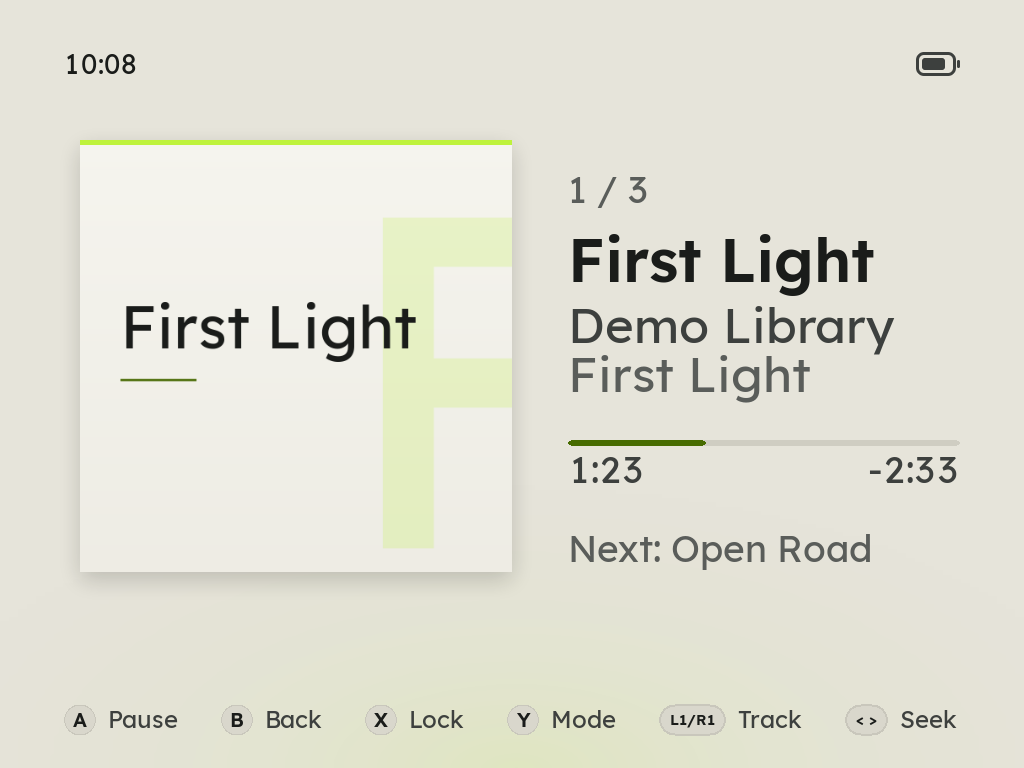
| Button | On Now Playing |
|---|---|
| A | Pause or play |
| L1 / R1 | The previous or next track, or a book's chapter |
| Left / Right | Back or ahead ten seconds; held, a minute a step, then five |
| Y | The play mode for music; the speed for a book, 0.75x to 2x |
| X, or SELECT + START | Lock the screen |
| SELECT | Close MP4; the music keeps playing |
Leave MP4 and the music goes on behind the menus. On the home and a games shelf, L2 and R2 then skip tracks, and Zyper pops up with what plays now. While music plays, a running game is silent; pause the music and the game is heard again.
The Pixel 2 has one speaker, so out of it the sound is mono, both channels mixed, and headphones get stereo. MENU > Sound > Audio Channels changes that.
On a video, Y switches between full screen, where the controls show only when you press a button, and a view with the controls always on screen. Every video and every book remembers where you stopped, even through a power-off.
Music behind the menus
Besides MP4, ZyperOS plays music behind the shelf and the menus, never over a game: ten free 8-bit tracks, and your own. Yours go in Menu Music, a folder of its own at the top of the card, beside Music and Videos. Copy MP3 or Ogg files there with the card in a computer, in Flash Drive, or on the File Transfer page; folders inside it play too, two deep.
MENU > Sound > Menu Music turns the music on or off, sets its volume, and shuffles or plays one track over and over. Once you have songs of your own, its ZyperOS Tracks row turns ZyperOS's ten off, so only yours play. On the shelf, L2 and R2 go to the song before or the next, and Zyper pops up with each new song's name.
Coming from ROGUE OS, or from ZyperOS before 1.0.5? Songs in Roms/BGM no longer play. Move them into Menu Music. ZyperOS leaves Roms/BGM as it is, and deletes nothing in it.
Lock the screen for a pocket
Press X, or SELECT and START together, on any MP4 screen while something plays. With music or a book the screen goes dark, and every button is ignored except the volume keys. On a book, that took about 6 hours of listening to 10. A video stays in sight. Any other button shows the lock screen for a moment, with how to unlock it: hold SELECT and START together for two seconds.
Covers
An album's cover comes from its own files, or a picture in its folder. For albums with none, or only a small one, MENU > Album Art on MP4's shelf fetches a sharper cover from MusicBrainz's Cover Art Archive. It needs an internet connection. Use a USB Wi-Fi adapter or an Android phone with USB tethering, as the connection guide explains.
Headphones
Wired headphones in the jack, or a USB-C headphone adapter in the port, take the sound the moment they are plugged in. The Pixel 2 has no Bluetooth, so Bluetooth headphones do not work on it.