Box Art and Video Previews on the GKD Pixel 2
A shelf of covers is easier to browse than a list of file names. On many systems for the GKD Pixel 2 you scrape box art on a computer and copy it over. ZyperOS fetches it on the handheld itself, from three sources, and can turn a cover into a few seconds of the game. This guide shows how, and what to do for a game no source has.
On this page
These steps cover ZyperOS 1.0.5. Check your version in MENU > About.
The short answer
- Get the handheld online: plug in a USB Wi-Fi adapter and join a network, or plug in an Android phone, choose Phone and turn on its USB tethering.
- Open MENU > Games > Scraper. The page says how many covers a run will look for.
- Press A and watch the covers come in. B stops it at any time. The shelf has the covers when you leave the page.
That uses libretro's free collection, with no account. The rest of this guide adds better matches, game details and video snaps.
The three sources
MENU > Games > Scraper says first what a run will get: the covers, the video snaps, on which systems, and the room they take. Y opens Systems, to turn a console's covers or videos on or off. A run asks the sources in this order.
 Games > Scraper: each system's icon with a cover mark and a video mark, then Covers, 523 on 7 systems, and Videos, 210 on 3 systems, +525 MB">
| Source | Account | What it brings |
|---|---|---|
| ScreenScraper | A free ScreenScraper account, linked in Scraper's Settings | Covers, plus each game's name, year, genre and synopsis, and the video snaps. Asked first when linked. |
| libretro | None | Covers from libretro's thumbnail collection, by file name, and for zipped games by checksum. |
| SteamGridDB | Your own free API key | Portrait covers for what the other two lack, such as homebrew, hacks and ports. Asked last. |
ScreenScraper also needs a developer pair that each ZyperOS build is made with. A build without it says not in this build in Scraper's Settings, and the fetch uses libretro and SteamGridDB.
libretro: matching by checksum
libretro files its covers under the game's name in No-Intro's catalog. A zip records its ROM's checksum, so when the file name does not match, ZyperOS looks the game up by that checksum instead, and a file with an old or odd name still finds its box.
SteamGridDB: adding your key
Get a free API key at steamgriddb.com, under Preferences, API. Type it on SteamGridDB's page in MENU > Games > Scraper's Settings (START), or paste it on the File Transfer page in a browser, which is easier than typing 32 characters on the handheld. The key stays on the card, and ZyperOS shows only its last four characters.
Video previews on the shelf
With ScreenScraper linked, ZyperOS can fetch each game's video snap: a few seconds of the game's own screen. Rest on a game for one second and its cover turns wide and plays the snap in a loop. Move on, or open a menu, and the cover comes back.
Videos are off to start, as a snap is a megabyte or three. In MENU > Games > Scraper, Y opens Systems: X on a console turns its videos on, and Y there picks which games get one: all of them, your favorites, or the games you have played. The page says the room they will take before a run, and what they take after it.
The Video Snaps page, in the Scraper's Settings, has the rest:
- Play on the Shelf: on to start.
- Sound: muted to start, quiet or full. Never over music playing in MP4.
- Each console: whether its snaps play on the shelf, with the room they take.
- Delete All, after a question.
A snap is a file, Roms/<console>/.media/<game>.mp4, beside the cover. One you put there yourself plays too.
A game no source has
Fan translations, homebrew and rare dumps are often in no catalog. Add a cover yourself:
- Make a PNG about 512 pixels on its long side.
- Name it exactly like the game file, with
.pngin place of its extension:Black Castle.gbwantsBlack Castle.png. - Put it in
Roms/<console>/.media/, with the card in a computer or on the File Transfer page.
A fetch never writes over a cover that is already there. To swap one, press X on the game and choose Cover and Video: it shows the cover you have beside every one libretro, ScreenScraper and SteamGridDB offer, named with where it comes from. A shows one big, A again uses it, and the cover it replaced is kept to put back.
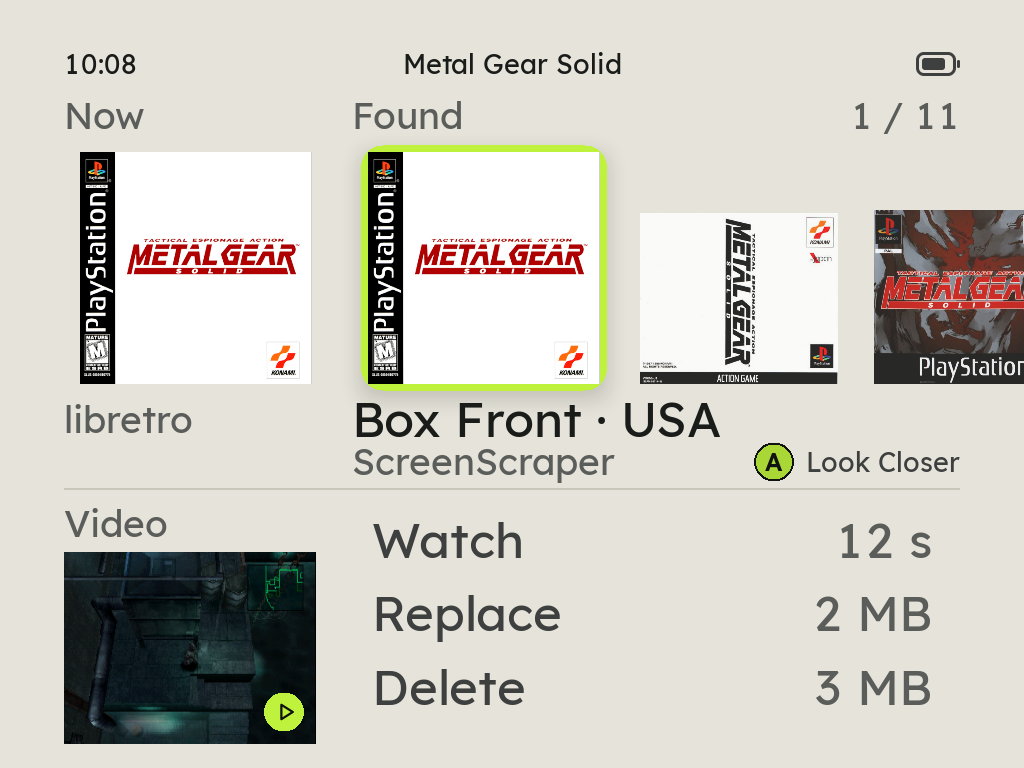
Covers that went missing after a transfer
A console's folder sent with the File Transfer page arrives without its covers, because a browser leaves the hidden .media folder behind. Send the covers on their own: drop the PNG files into the console's .media folder on the page, or drag the .media folder itself onto the console's folder. On a Mac, Cmd-Shift-. shows hidden folders in Finder.
No Wi-Fi adapter? Plug in an Android phone, choose Phone and turn on its USB tethering: MENU > Games > Scraper, a console's Box Art and a game's Cover and Video then use the phone's internet, as over Wi-Fi (a phone on the cable). Or, over the USB cable from a computer, the File Transfer page's Settings can fetch missing box art with the computer's own internet, and the handheld matches each cover to its game.
Covers from an EmulationStation system
Coming from Knulli, ROCKNIX, ArkOS or ROGUE OS? Copy their roms folders into Roms/ as they are. The covers, video snaps, names and details their scrapers left (gamelist.xml, images/, videos/, media/) show on the shelf as they are, with no new scrape. A cover ZyperOS fetched or you picked comes first, and a Scraper run only fetches for games with no cover at all.